Help
Fix an issue
How to
SeriesGuide X
Basics
Backup and Cloud
Trakt integration
Something else?
Fix an issue
Subscription is not recognized
If you have an active subscription, but SeriesGuide does not recognize it, have a look at the troubleshooting steps from Google Play Help.
If you have multiple Google accounts, check that SeriesGuide was installed with the correct account active in the Play Store app.
Should this not resolve your issue, please contact me (tap More menu > Send Feedback inside the app or use the developer contact on the Play Store page).
Could not talk to TMDB or Trakt
ℹ️ Since 2022-04-10, in Russia or Belarus it is currently not possible to search for, add or update shows and movies in SeriesGuide.
This is because the data source SeriesGuide uses, TMDB, is blocking access from IP addresses attributed to the Russia or Belarus region out of solidarity due to the ongoing war in Ukraine. Read the TMDB statement.
ℹ️ Some countries or internet service providers (ISP) are known to block themoviedb.org or trakt.tv (like in India). In this case it may be possible to use custom DNS servers, switch to another connection (different ISP) or use VPN software (at your own risk).
If you receive this error there might be a temporary issue with either your internet connection or one of the services SeriesGuide uses.
You can check the following to learn about ongoing issues and their status:
- TMDB support forums and TMDB Status page
- Trakt X account and Trakt status page
- SeriesGuide X account or announcements on the forum
Keep in mind that TMDB, Trakt as well as SeriesGuide are services operated by a small or even one-person staff. If the service experiences issues, the person which can fix it can not always be available (it's night time, they are working another job or are on holiday). So it can take time until issues are resolved. Please do not expect 24/7 availability like from services that can afford a large, around the world support staff.
So please be patient and try again later. If the issue persists after a few days, then please let me know about it.
Thank you for understanding!
Show, episode or movie data is outdated or missing
ℹ On OnePlus OxygenOS 12 syncing fails if your device has less than 10% free storage.
ℹ Show and movie data is loaded from the user-created database at themoviedb.org. The contributors there are typically quick to update things. If not, consider to help out.
ℹ Access to the services SeriesGuide uses might be (temporarily) blocked in your region, for example because your internet connection has issues or your internet provider is blocking access. Try checking the forum for other affected users.
Regardless, here are some things to check and try:
Check Sync & Update setting
Tap More menu, then Settings and check if Sync & Update is enabled.
Check device Accounts sync setting
Open the Settings app of your device. Find and open the Accounts settings and check that Auto-sync data is enabled. You should also see a SeriesGuide Sync account there.
Check device power saving settings
SeriesGuide might not be able to update in the background because of battery use optimization settings. Try to exclude SeriesGuide from battery use optimizations.
Last resort: remove and add the show again
If a show does not update, as a last resort, remove the show and add it again.
Can not find a show or movie
If the show is added to your library:
- From the Shows list, tap Filter shows .
- Check the Filter shows and Sort shows settings. A show might be not shown or shown at an unexpected position because of them.
When trying to search for a show or movie:
- If search can't find a show, try the tips post on the forum.
- Also, sometimes a supposedly TV show is actually a series of movies and can be found under Movies.
- The same applies to movies, for example made for TV movies are found under Shows.
Anyhow, all series and movie data is loaded from the user-created database at themoviedb.org. Feel free to help out there to add missing information for all other users.
A translation is wrong or missing
Show, episode or movie titles and descriptions
You can help improve the translation at themoviedb.org.
User interface (like buttons)
Please send a message or consider to translate or proof read.
The release time of a show or episode is wrong
ℹ The show/episode release times are restricted to the original release in the country of origin.
✅ If you want local listings and listings of re-broadcasts, please look for a suitable TV guide offering in your region.
If the release country is known, SeriesGuide assumes the release time is in a time zone of this country (for example Eastern Time for US shows, British Time for British shows, Central European Time for German shows, ...). Then it is converted to your device time zone.
If the release country is not known, SeriesGuide will assume the country to be the United States of America.
You can view the country in the detailed show information.
ℹ If your device is set to a US mainland time zone, SeriesGuide will automatically adjust the release time (for example one hour earlier in Central Time).
If the displayed country is not correct it can be changed at the data source.
If the country is correct, but you believe the release time is incorrectly converted in SeriesGuide, please send a message.
Watching shows or movies is not supported
You can not watch shows or movies within SeriesGuide.
However, on the episode and movie details screens there is a Stream or puchase button to help you find streaming and purchasing services a show or movie is available on in your region.
Images are not displayed
- Desired language has no poster
- Try to change the language of the show, most often to English. If you prefer another language, change the alternative language in settings to English instead.
- Image cache is corrupted
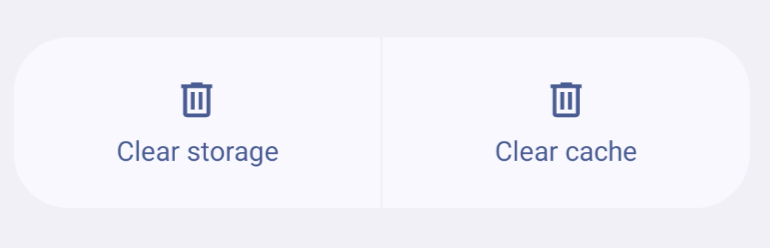
- You can try clearing the cache for SeriesGuide. Tap More > Settings > Clear image cache. In the App Info screen that opens, go to Storage and tap Clear Cache.
- Images over Wi-Fi only is enabled
- If your current connection is metered and this setting is enabled, no images are downloaded. Tap More > Settings and disable the setting.
- Prevent spoilers setting is enabled
- If an episode is not watched and this setting is enabled, the episode image remains hidden. Tap More > Settings > Advanced. Disable the setting.
Notifications appear too late
If notifications only appear once you start using your device, SeriesGuide is affected by the battery use optimization settings of your device.
To disable battery optimization for SeriesGuide:
- open the Settings app,
- go to Apps and look for SeriesGuide,
- open the Battery section,
- choose Unrestricted or change Battery optimization to Don't optimize.
The widget is not updating or is missing
You may have moved SeriesGuide to the SD card/external storage. For SeriesGuide to work properly it has to be installed on your device/internal memory. Move it back and everything should be fine again (if not, try rebooting your device).
If that is not the case, it may help to exclude SeriesGuide from battery optimizations.
After changing the time zone, times are incorrect
Please stop SeriesGuide and restart it:
- Tap the switch app button on your device.
- Swipe SeriesGuide away or tap the X button.
- Launch the SeriesGuide app again.
If that won't help, try to update all shows.
How to
Unlock all features
Learn more about unlocking all features.
Hide the SeriesGuide X app icon from the launcher
ℹ On Android 13 and newer, it is no longer possible to hide the launcher icon (apparently malicious apps have been abusing this to hide from users).
Launch the SeriesGuide X unlock app, then tap the button at the bottom to hide the launcher icon. It may take a few seconds for the icon to disappear from your launcher. On some devices, it may be necessary to reboot the device.
To restore the icon, uninstall the SeriesGuide X app either from your devices Settings or the Play Store app. Then install it again.
Check in, set watched, add to collection and skip
Each episode or movie displays a button bar with up to four actions:
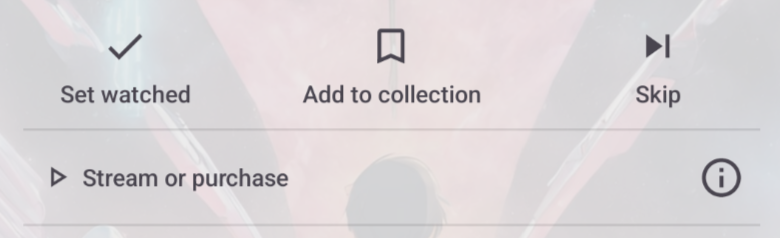
- Check in via Trakt if you are watching right now. (Not available if SeriesGuide Cloud is connected.)
- Set watched if you have watched this.
- Add to collection if you purchased (DVD, Blu-Ray) or downloaded this.
- Skip if you don't want to watch this right now. (Only for episodes, not synced with Trakt)
Note On Android you can tap and hold most symbol-only buttons to show a brief description of what they do.
Remove a show
To remove a show:
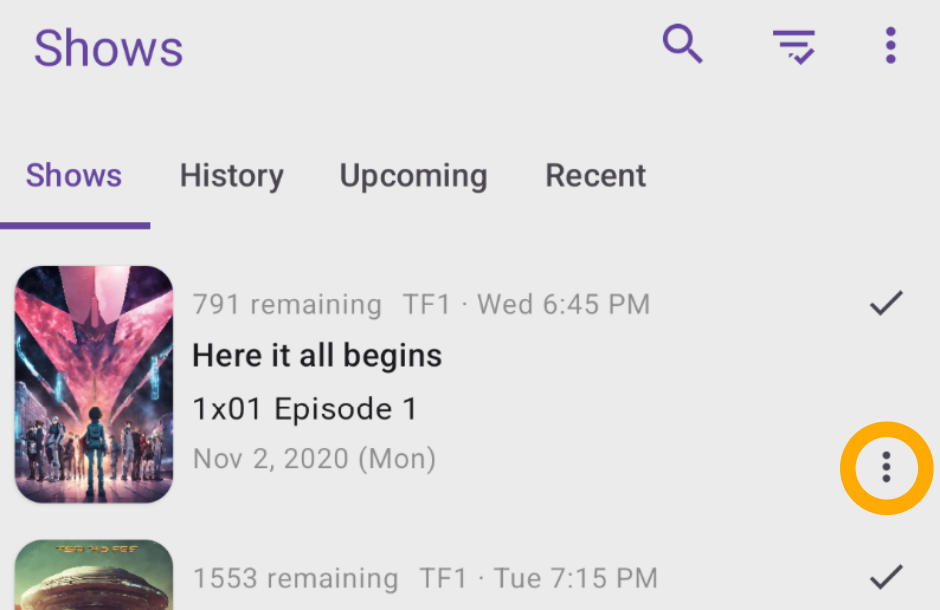
- From the show list, tap More options of a show.
- Tap Remove.
Make a hidden show visible again
- From the Shows list, tap the Filter shows button.
- Change Hidden to Included and all other filters to Deactivated to display all hidden shows.
- Find the show to make visible and tap More options .
- Tap Do not hide.
Note After tapping the filter button use Reset all filters to restore the default shows list view.
Manually update shows
Note By default, show and episode data is updated regularly.
Update a single show:
- From the show list, tap More options of a show.
- Select Update.
Update all shows:
- From the show list, tap More options .
- Tap Sync manually.
- Tap Sync & Update.
Note You can force a re-download of all shows using Sync & Download all.
Change the app language
If available, SeriesGuide will use the language your Android device is set to. Otherwise it will fall back to English. To change the language of your Android device look in the Android Settings app.
Note All translations come from amazing volunteers who translate on crowdin. Please consider to translate or proof read as well!
Change the language of a show
Note SeriesGuide adds a show in the language you have chosen using the globe icon.
To change the language of a show already in your library:
- Tap on the show to view its overview screen.
- Swipe to the Show tab.
- Tap the globe icon .
- Choose a language.
In More > Settings > Advanced you can set an Alternative Language. The alternative language will be used if no translation or poster in the language chosen for a particular show is available.
Note If a translation is missing, help contribute one.
Improve show, episode and movie data
The main data provider for shows and movies is themoviedb.org (TMDb). Additional data for shows is provided by Trakt.
The data in TMDB is contributed by its users. Consider to help this project by adding or updating information!
Below are the sources of some important data in SeriesGuide:
Backup or restore your data using files
To backup your shows, lists and movies:
- In the bottom bar, tap More > Settings.
- Tap Backup/Restore.
- Look for the Create backup section.
- Tap Select file for either shows, lists or movies to create a backup.
Note On Android 4.3 and older you can not choose the backup file location. Instead SeriesGuide will store the backup files in the Download folder on your device.
To restore your shows, lists and movies:
- In the bottom bar, tap More > Settings.
- Tap Backup/Restore.
- Look for the Restore backup section.
- Tap Select file for each type of data you want to restore and select the matching backup file.
- Tick the check box next to each type you want to restore.
- Tap Restore backup.
To restore your backup on another device, first transfer the created files to it. For example send yourself an email with the files attached, plug your device into a computer to access its storage or save the files to online storage.
Note You can use a file manager app to view or copy the backup files.
Note You can import data from another source as long as it uses the JSON format that SeriesGuide expects. Add some shows/lists/movies and create a backup, then just open the created JSON file to see an example with actual data.
Restore your data from an Auto Backup
Auto Backup creates a file-based weekly automatic backup of your shows, lists and movies.
To restore an Auto Backup:
- In the bottom bar, tap More > Settings.
- Tap Auto Backup.
- Tap the Restore Auto Backup button. If it is disabled, there is no auto backup available to restore from. Use the Backup/Restore tool to restore a backup from another location (e.g. Google Drive).
Note Restoring a backup affects your device only. It won't affect data synced to Cloud or Trakt.
To turn on and configure Auto Backup:
- In the bottom bar, tap More > Settings.
- Tap Auto Backup.
- Turn on Auto Backup.
- (Recommended) Enable the option to create copies, select files in an off-device location (e.g. Google Drive).
Note The Auto Backup files are saved to a storage directory that is removed when the app is uninstalled. Hence, it is recommended to turn on the option to create additional backups to an off-device location (e.g. Google Drive).
Backup and sync using SeriesGuide Cloud or Trakt
You can backup and sync using either SeriesGuide Cloud or Trakt. Each has its advantages and disadvantages. Which one you want to use depends on the devices and apps you use.
SeriesGuide Cloud
Works best if you only use SeriesGuide on your devices. It supports backing up and syncing all SeriesGuide data:
- Sync
- Shows
- Lists
- Movies
Trakt
Works best if you use other apps connected to Trakt (for example apps on iOS or a media center) or the Trakt website. It supports:
- Sync
- Shows (excluding favorite/hidden state, skipped state)
- Movies (watchlist, collection, watched)
- Display your and friends Trakt viewing history.
- Check-in (episodes and movies).
- Post comments.
- Rate shows, episodes and movies.
Note Unlike with Cloud, shows are not added automatically and the Lists section is not synced. But you can quickly access your Trakt show watchlist and watched and collected shows.
Check-Ins are submitted immediately to Trakt. But only with the next sync are checked-in episodes and movies marked as watched within SeriesGuide.
Setup
To connect to either service:
- In the bottom bar, tap More .
- Tap either SeriesGuide Cloud or Trakt.
- Tap the sign in or connect button and complete the sign-in process.
Note You can be connected to SeriesGuide Cloud and Trakt at the same time. Setting watched and collected, commenting, rating and more will still be sent to Trakt. However, check-in and sync with Trakt will be disabled. Changes on the Trakt website or other apps connected to Trakt will not download.
Note You can always change your mind! First, disconnect both SeriesGuide Cloud and Trakt. Then, sign into only one of them. The data on your device will be merged with the existing data on the service.
Change the email address used for SeriesGuide Cloud
This requires to create a new account with the new email address. Optionally, you can remove your previous account. To do so:
- In the bottom bar, tap More .
- Tap SeriesGuide Cloud.
- Then either Sign Out or Delete account.
- Once completed, Sign In with a different email address to create a new account. All data on your device will be uploaded to the new account.
Delete your SeriesGuide Cloud account
Note This will remove all uploaded shows, episodes, lists and movies from Cloud. You can create a new account at any time.
- In the bottom bar, tap More .
- Tap SeriesGuide Cloud.
- Then tap Delete account and confirm.
If you do not have SeriesGuide installed, you can also send a message to request your account to get deleted.
Note To delete your Trakt account, visit their website.
Connect to Trakt
- Tap More > Trakt.
- Tap Connect and follow the onscreen instructions.
Troubleshooting If you can't connect (white screen, error message), Trakt may currently be unreachable (check status.trakt.tv, @trakt on X or the SeriesGuide forum for status updates). Please try again later.
Try to turn off any proxy or VPN (for example for ad blocking). Try to clear the SeriesGuide cache (in your device settings, in Apps find SeriesGuide, then in Storage tap Clear Cache).
When using a privacy tool (for example a Xposed module), make sure SeriesGuide has access to the Android account system. It needs an account to store your Trakt credentials and sync.
If your issue persists, please contact me about what is going wrong (send a screenshot if possible).
Add shows from your Trakt library
- From the shows list, tap the add button
 .
. - Tap the Watched, Collection or Watchlist button.
- Tap the plus button next to a show or use the add all button at the top.
What is synced with Trakt
How check-ins work
Check-in to let friends or the world know what you are watching right now. Checking in requires you to connect SeriesGuide only with Trakt.
After the runtime of the episode or movie has passed, the episode or movie will be set watched on your Trakt profile and in SeriesGuide.
Will there be an iOS version?
At this point there are no plans to release a version for Apple devices. There are some alternatives available, e.g. on the US App Store.
View and send debug logs
To enable and send debug logs:
- In More > Settings turn on Debug mode and restart SeriesGuide.
- Then do what is failing again.
- Then go to More > Debug View > Show logs and then Share and email me the log file.
- Then turn off Debug mode and restart the app afterwards (leaving it on slows down the app).
Something else? Ask for help!
If you could not solve your issue with this page, you can try searching or asking on Discord or the Forum. If needed, you can also send an email.